Logging In
Opening Test Services
Test Services runs in a web browser. The URL depends on your deployment type:
| Deployment | URL |
|---|---|
| Server, AIC, Workstation, Workstation Plus | https://hostname.domain.com/testservices or https://localhost/testservices |
| Client (local access) | https://localhost:52088/testservices |
| Client (remote access) | https://<client-fqdn>:52088/testservices |
If there is a firewall on the client system, make sure port 52088 is open.
Signing in
After the login page appears, enter the user name and password you use to log in to OpenLab CDS (and a Domain, if applicable), then click Sign in.
If you are using a file-based Workstation with authorization set to None, no login is required.
For the first login after installation, the user must have the OpenLab Shared Services administrator role to allow the framework to finish registering itself with the OpenLab Server. After the first login, the Test Services User role is sufficient.
After signing in
The Test Services home page appears (Figure 1).
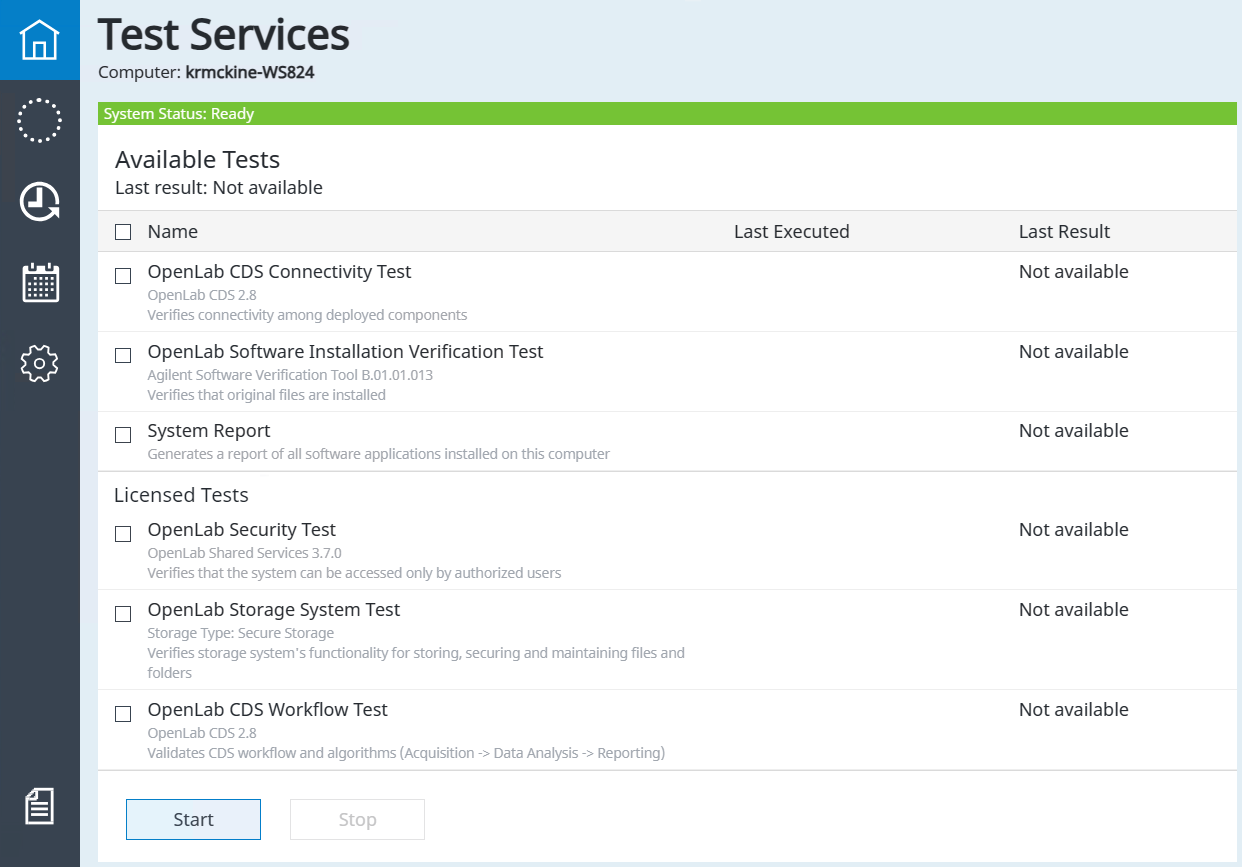
- Tests that do not require a license are displayed at the top.
- Tests that require a license are displayed under Licensed Tests.
- By default, only recommended tests are shown. Click Show all tests to display all available tests regardless of whether they are recommended for the current machine.
Licenses and roles
- Where a license is required, it must be installed before running the test. The license is acquired at first execution, and the display shows License Acquired.
- The license is not released back to the license pool after the Security Test or OpenLab Storage System Test completes.
- If there are insufficient licenses, the test fails at the step "Checking for the license QlaSecurity."
- To execute the OpenLab Security Test or OpenLab Storage System Test, the System Administrator role with the Manage Security privilege is required.
For details on roles and privileges, see Test Services Roles. For help editing a user account, see the OpenLab CDS online help.
Licensing for Test Services tests
All applicable licenses are included with OpenLab CDS Workstation Plus systems. For other CDS products, licenses must be purchased and installed separately. For more information, see Licensing.