Deployment architecture
Test Services runs on the OpenLab CDS machines that take part in verification. The topology determines which tests are installed on each machine, which tests are recommended there, and where purchased licenses are required. The four diagrams below show the supported deployment arrangements. For why the recommendations differ by machine type, see System types and recommended tests.
Each machine in a diagram uses the same layout. The text below the machine type identifies the applicable commercial product or states that no Test Services license is needed. Within the Test Services framework and OpenLab CDS plug-in, each test identifies the runtime license it checks and whether it is recommended, not recommended, or disabled on that machine. For more about the licenses, see About licensing.
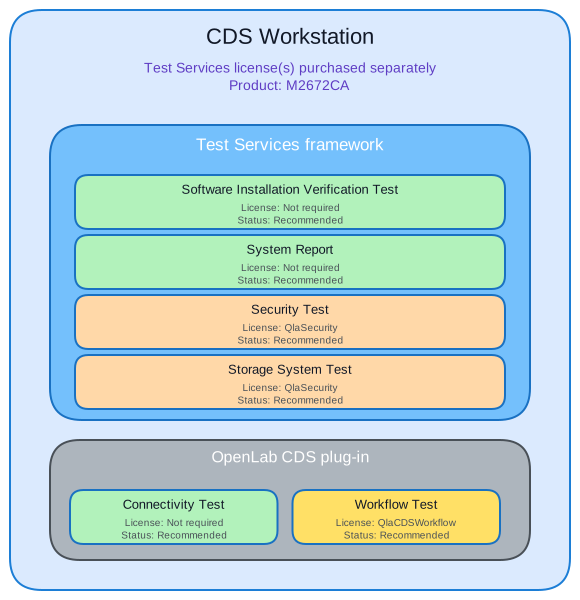
CDS Workstation
A CDS Workstation is a standalone deployment. All six tests are recommended because the same machine provides the OpenLab platform, storage, and acquisition functions. The Test Services licenses are purchased separately as product M2672CA.
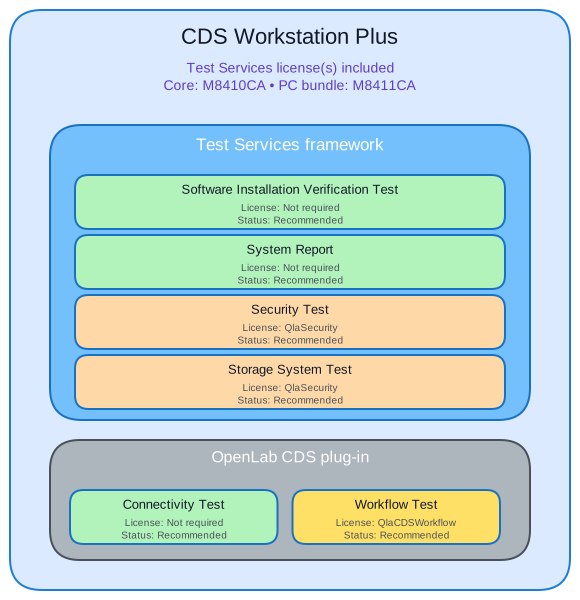
CDS Workstation Plus
A CDS Workstation Plus has the same six recommended tests as a CDS Workstation. Its Test Services licenses are included with the OpenLab CDS Workstation Plus core product M8410CA and PC bundle M8411CA, so no separate Test Services license purchase is needed.
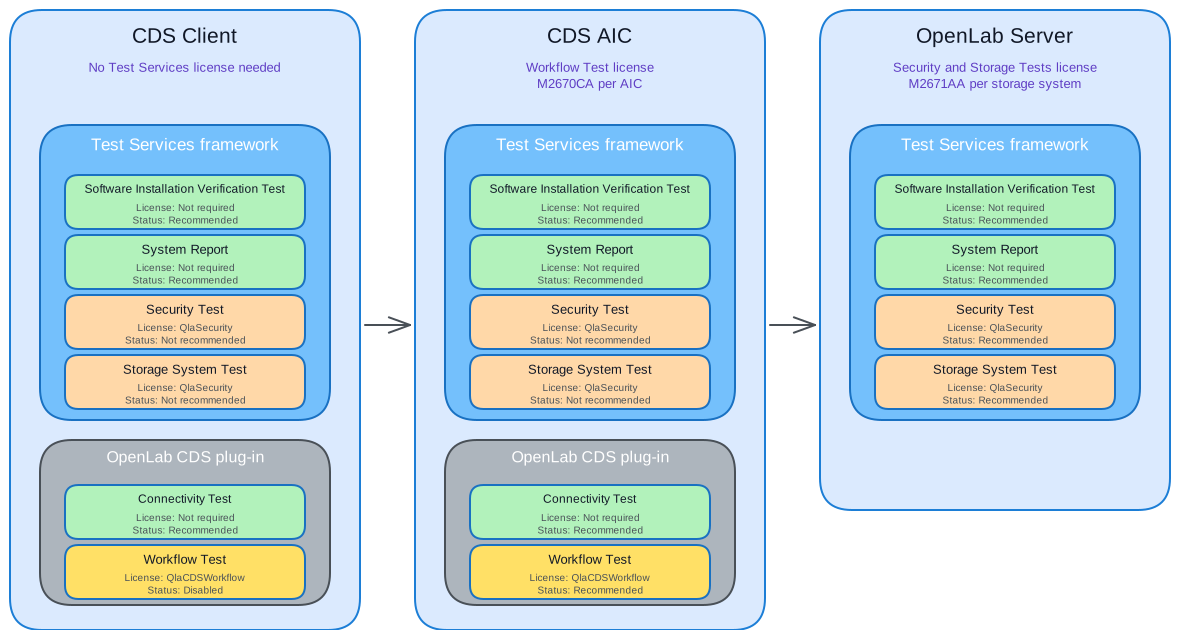
Client/server with an OpenLab Server storage backend
In this client/server deployment, the CDS Client, CDS AIC, and OpenLab Server each run the tests appropriate to their role. No Test Services license needs to be purchased for a Client. Purchase the Workflow Test product M2670CA for each AIC and the Security and Storage Tests product M2671AA for each storage system.
On a Client, the Security Test and Storage System Test are not recommended and the Workflow Test is disabled. The AIC is the recommended location for the Connectivity Test and Workflow Test. The OpenLab Server is the recommended location for the Security Test and Storage System Test and has no OpenLab CDS plug-in tests.
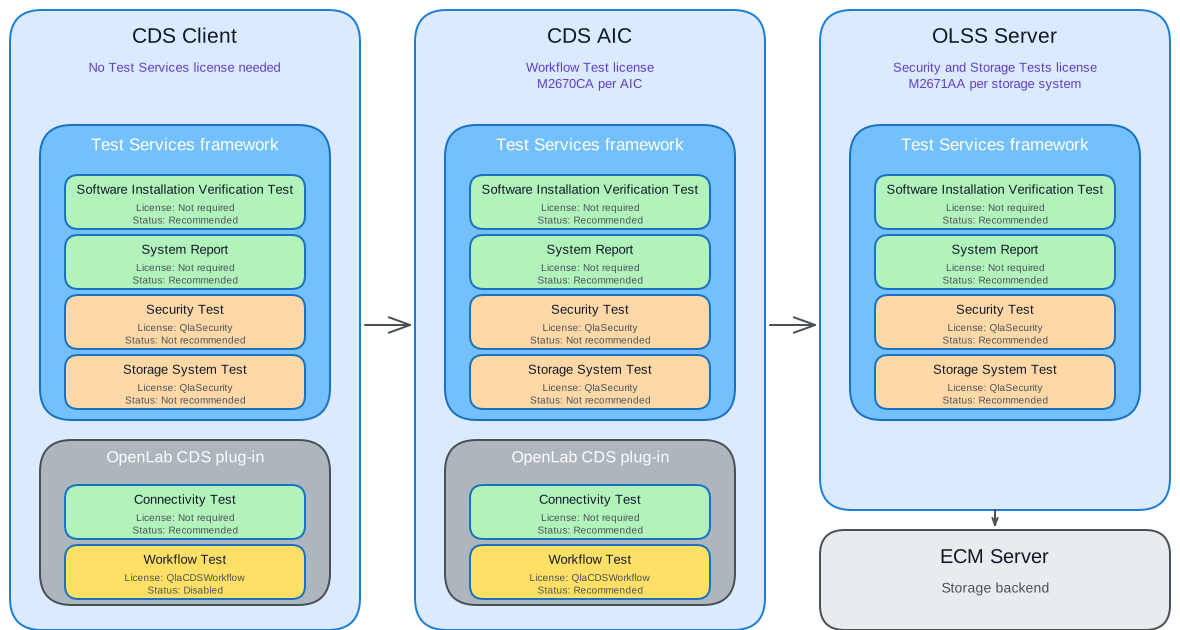
Client/server with an ECM storage backend
In an ECM deployment, the Client and AIC have the same Test Services roles and licensing as in the OpenLab Server deployment. No Test Services license needs to be purchased for a Client. Purchase the Workflow Test product M2670CA for each AIC and the Security and Storage Tests product M2671AA for each storage system.
The OpenLab Shared Services (OLSS) Server runs the Test Services framework and is the recommended location for the Security Test and Storage System Test. The separate ECM Server provides the storage backend.
Reaching Test Services in each topology
Test Services is reached through a browser. The address depends on the machine's role, and a client uses a non-standard port.
Table 1. Test Services address by deployment
| Deployment | Address |
|---|---|
| OpenLab Server, OLSS Server, AIC, Workstation, or Workstation Plus | https://<hostname>.<domain>/testservices or https://localhost/testservices |
| Client (local access) | https://localhost:52088/testservices |
| Client (remote access) | https://<client-fqdn>:52088/testservices |
Replace <hostname>.<domain> with the fully qualified domain name of the server, AIC, or workstation, and <client-fqdn> with the fully qualified domain name of the client.
If a client has a firewall, make sure port 52088 is open. For enterprise OpenLab Server clusters behind a load balancer, the balancer needs extra configuration; see Configure for an enterprise OpenLab Server topology.
See also
- How Test Services works: the deployment model and how a test reaches OpenLab CDS.
- System types and recommended tests: why the recommended set differs by machine type.
- Available tests: every test and where it runs.
- System requirements: supported deployments and platforms.
- Log in to Test Services: logging in at the address for your deployment.
- Configure for an enterprise OpenLab Server topology: load-balancer configuration for clustered servers.
Last updated: